How to Compress a PDF for Email (Get It Under 10 MB or 25 MB)
Updated · 3 min read
You attach a PDF, press send, and your email app says the file is too large. This happens most with scanned documents and PDFs full of photos, because every page is stored as a big picture. The fix is to compress the PDF, which takes about a minute.
Open Compress PDFFree, no sign-up. Your file stays on your device.
How big can an email attachment be?
Every email service has its own limit. These were the limits in October 2026:
- Gmail (personal accounts): 25 MB of attachments. Anything bigger is turned into a Google Drive link instead of an attachment.
- Outlook.com: 20 MB, and that counts the email and its attachments together.
- iCloud Mail: 20 MB per message, or up to 5 GB if you turn on Mail Drop.
- Work email: your company sets the limit. Microsoft's default for business accounts is 10 MB.
The person receiving your email has a limit too. If you keep your PDF under 10 MB, it will get through almost everywhere.
How to compress a PDF, step by step
- Open Compress PDF on Don's Free PDF and choose your file. It opens in your browser and is never uploaded.
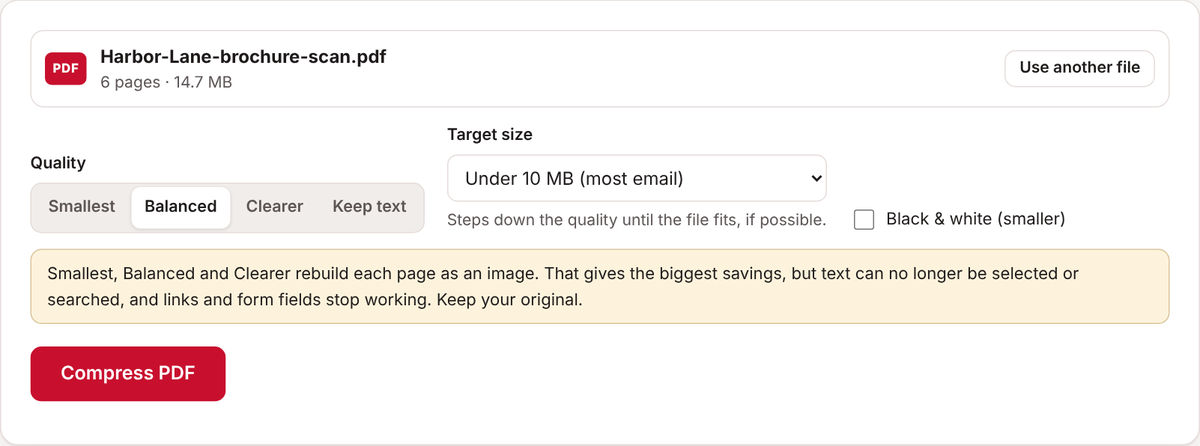
- Leave Quality on Balanced to start.
- Under Target size, pick the limit you need, such as Under 10 MB (most email) or Under 25 MB (Gmail).
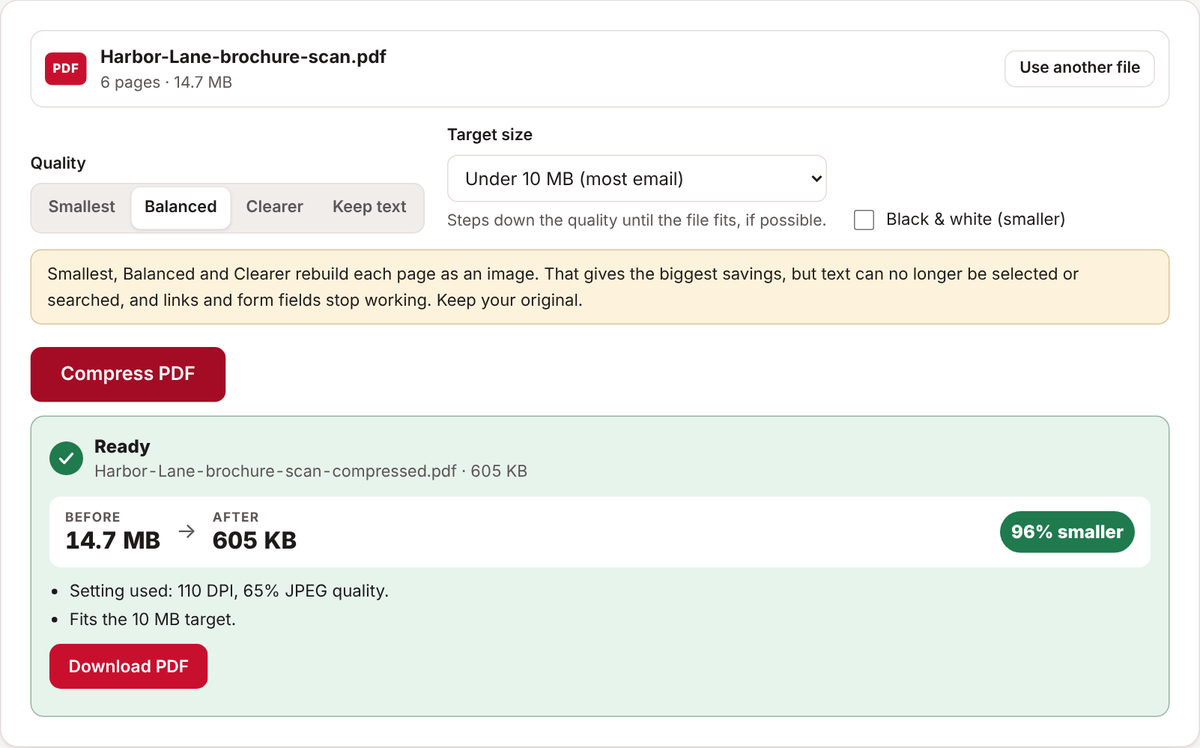
- Click Compress PDF. The tool lowers the quality step by step until the file fits, and tells you if it can't get there.
- Check the before and after sizes, then click Download PDF.
- Open the new file and make sure every page is still easy to read before you send it.
Which quality setting should you choose?
- Keep text makes the file smaller without changing how it works. Text stays selectable, links still work and form fields can still be filled in. It suits PDFs made on a computer, like invoices or documents saved from Word. The savings are usually smaller.
- Smallest, Balanced and Clearer rebuild each page as an image. This gives the biggest savings, especially for scans, but the text can no longer be selected or searched, and links and form fields stop working. Keep your original file.
- Black & white makes scans of plain text documents even smaller.
What if the file is still too big?
- Try Smallest, or tick Black & white.
- Split the PDF into two or three parts with Split PDF and send them in separate emails.
- Share a link instead of attaching the file, for example with Google Drive, OneDrive or iCloud Mail Drop.
Common questions
Will compressing make my PDF blurry?
Balanced is sharp enough for reading on screen and normal printing. If small print looks soft, try Clearer. For PDFs that are mostly text, Keep text changes nothing you can see.
Is it safe to compress a confidential PDF?
With Don's Free PDF, yes. Many online compressors upload your file to their servers to process it. This tool does everything inside your own browser, so the document never leaves your device.
Why did my file barely shrink?
Some PDFs are already compressed well, especially ones made from text documents. Choose a stronger quality setting, or split the file.
Open Compress PDFFree, no sign-up. Your file stays on your device.