How to Password Protect a PDF for Free (Without Acrobat)
Updated · 2 min read
Tax returns, payslips, medical letters and contracts often travel by email, and email isn't private. Putting a password on the PDF means that only someone who knows the password can open it, even if the email ends up in the wrong inbox.
Open Protect PDFFree, no sign-up. Your file stays on your device.
How to add a password to a PDF
- Open Protect PDF and choose your file.
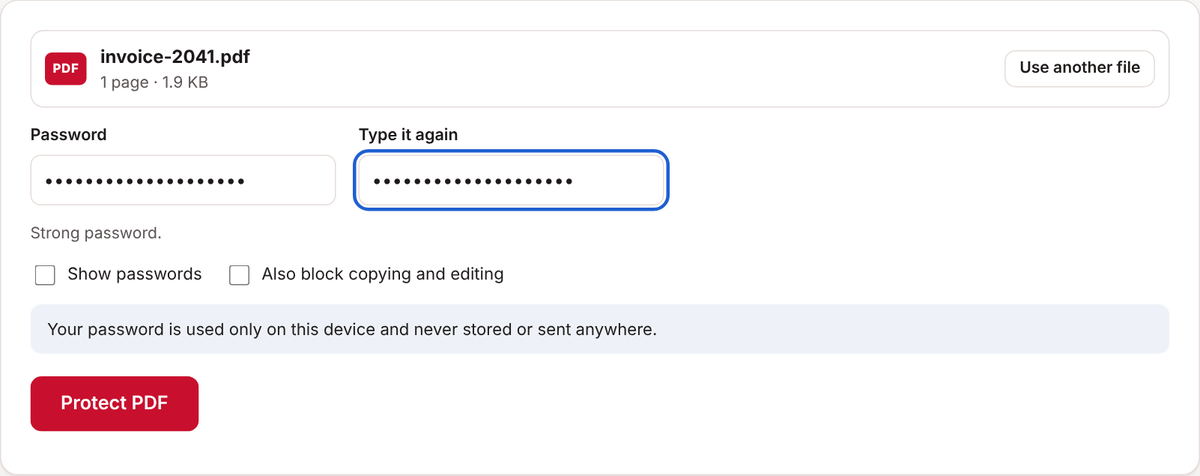
- Type a password, then type it again to confirm. The page tells you whether the password is strong.
- If you also want to stop people copying text or editing the file once it's open, tick Also block copying and editing.
- Click Protect PDF and download the protected file.
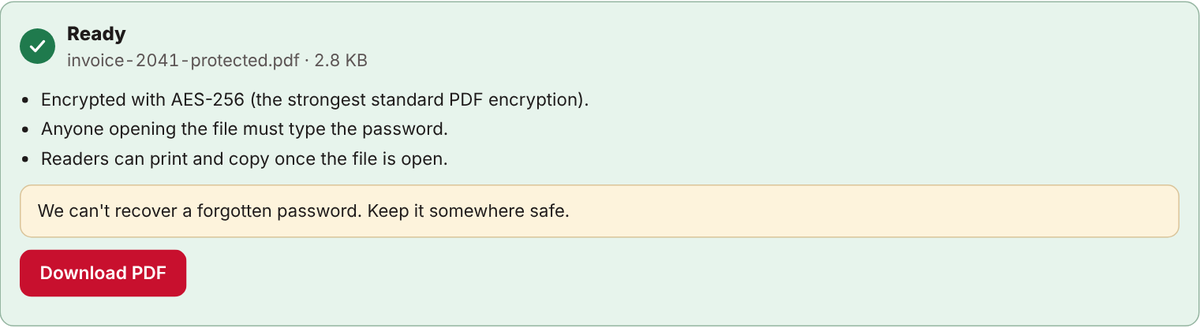
- Open it to check: your PDF reader should ask for the password.
How to choose a good password
- Use at least 12 characters. Three or four unrelated words joined together, like Maple-Tree-Window-42, are long and easy to remember.
- Don't use names, birthdays or anything someone could find on your social media.
- Send the password a different way from the file. If you email the PDF, text the password or say it on the phone.
- Write it down somewhere safe. A forgotten password can't be recovered by anyone, including us.
How strong is the protection?
Don's Free PDF uses AES-256, the strongest encryption in the PDF standard and the same level Adobe Acrobat uses for its highest setting. The encryption itself is very hard to break, so the real weak point is a short or guessable password.
The Also block copying and editing option is a different, weaker kind of protection. Most PDF readers respect it, but some programs ignore it. Treat it as a polite request, and rely on the password itself for privacy.
Common questions
Can people open it without Acrobat?
Yes. Current PDF apps, including Adobe Reader, Apple Preview, and the PDF viewers in Chrome, Edge and Firefox, can all open AES-256 protected files once you type the password. Very old PDF readers may not.
Can I protect a PDF on my phone?
Yes. The tool works the same way on iPhone, iPad and Android.
Is my password sent anywhere?
No. The file is encrypted in your browser. Neither the document nor the password is uploaded.
Are there other free ways to do this?
Yes. Microsoft Word can add a password when you save a document as PDF, and Apple's Preview can add one when you export a PDF. Don's Free PDF works on any device, including phones, and for PDFs you didn't make yourself.
Open Protect PDFFree, no sign-up. Your file stays on your device.